

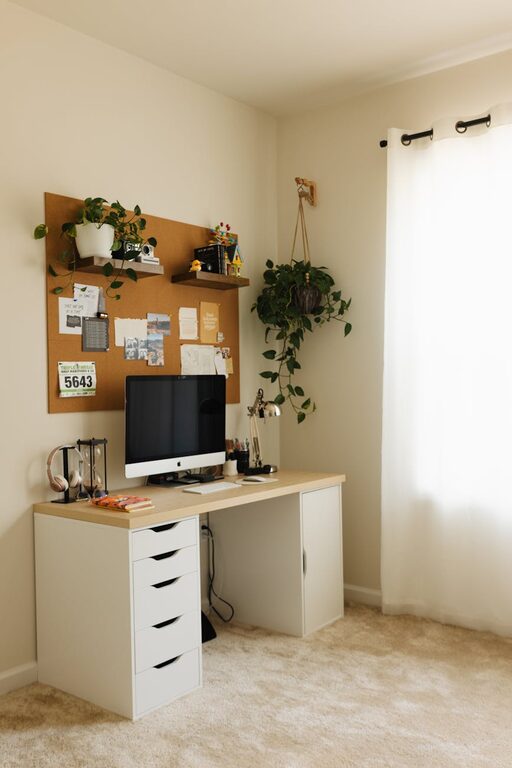
Creating a home office that is both cozy and productive can make a big difference in your work-from-home experience. Whether you are new to remote work or looking to refresh your current setup, the right environment can help you stay focused, motivated, and comfortable throughout the day. In this post, we will explore practical tips to design a home office space that supports your productivity while making it a place you truly enjoy spending time in.
Why a Cozy and Productive Home Office Matters
Working from home means spending hours in the same space. If your office feels cluttered, uncomfortable, or uninspiring, it can negatively impact your work quality and overall well-being. A cozy office invites you to settle in comfortably, while a productive space ensures you have everything you need to complete your tasks efficiently.
Balancing comfort with functionality is the key to setting up a workspace that supports both your mental and physical health. Let’s dive into how to create that balance.
Choose the Right Location
Find a Quiet, Low-Traffic Area
Selecting where to set up your office is the first and one of the most important steps. Ideally, pick a spot with minimal distractions and foot traffic — this could be a spare room, a corner in the living room, or even part of your bedroom if space is limited.
Maximize Natural Light
Natural light has a positive effect on mood and energy levels. Position your desk near a window if possible, but avoid glare on your computer screen by angling your desk appropriately.
Invest in Comfortable Furniture
Ergonomic Chair and Desk
A good chair and desk set the foundation for both comfort and productivity. Look for an ergonomic chair that supports your back and encourages good posture. Adjustable desks or standing desks can be a great addition, letting you change your position throughout the day.
Personal Touches Without Clutter
Adding personal touches to your workspace makes it feel welcoming. Photos, small plants, or favorite artwork can boost your mood. Just be mindful not to overcrowd your desk, which can lead to distraction.
Organize Your Workspace Efficiently
Use Storage Solutions
Keeping your desk tidy helps reduce stress and improves focus. Use shelves, drawers, or organizers to keep supplies, documents, and tech accessories neatly arranged.
Cable Management
Cables can become a tangled mess and distract from the workspace’s neatness. Use cable clips, ties, or boxes designed to keep wires organized and out of sight.
Enhance Lighting and Ambience
Layer Your Lighting
Good lighting reduces eye strain and creates a pleasant atmosphere. A combination of overhead lighting, task lamps for your desk, and ambient lights such as floor lamps or string lights can work well together.
Choose Warm Light Bulbs
Warm light bulbs contribute to a cozy feeling, making your home office inviting even during late hours.
Minimize Distractions
Set Boundaries
If you live with others, communicate your work hours clearly. A dedicated sign or a closed door can help indicate when you should not be disturbed.
Noise Management
Use noise-canceling headphones or play soft background music to drown out distractions. White noise machines or apps can also create a focused environment.
Incorporate Plants and Natural Elements
Adding greenery to your workspace has been shown to improve productivity and reduce stress. Small potted plants like succulents or a vase of fresh flowers can make your office feel more alive and refreshing.
Prioritize Air Quality and Comfort
Good ventilation and air circulation keep you alert and comfortable. If natural airflow is limited, consider using a small fan or air purifier. Keeping the room at a comfortable temperature also supports long hours of work without discomfort.
Set Up Technology Thoughtfully
Quality Equipment
Invest in reliable technology such as a good monitor, keyboard, and mouse. Ensure your internet connection is stable for video meetings and file uploads.
Minimize Screen Glare
Adjust screens or use anti-glare protectors to reduce eye strain, especially if you work long hours in front of a computer.
Plan for Breaks and Movement
Create a Space for Movements
If space allows, dedicate an area to stretch or do quick exercises. Taking breaks for movement refreshes your mind and prevents stiffness.
Use Timers
Set reminders or use apps that encourage you to take regular breaks. The Pomodoro Technique, for example, involves working in focused intervals with short breaks.
—
Creating a cozy and productive home office doesn’t require a big budget or complex redesign. By thoughtfully arranging your space with comfort, organization, and your unique work habits in mind, you can build a home office that feels just right and helps you perform at your best every day. Start with small changes and keep adjusting until you find your perfect balance!